Blog / Money / HL-006 ·

Fix or Float
Fixed or variable? The should-I-panic tool for home loans. The should-I-panic tool for home loans, with fewer panics and more charts.
- Web tool
- Money
- Live Apr 2026
- Web
What it is (besides a cure for spreadsheet envy)
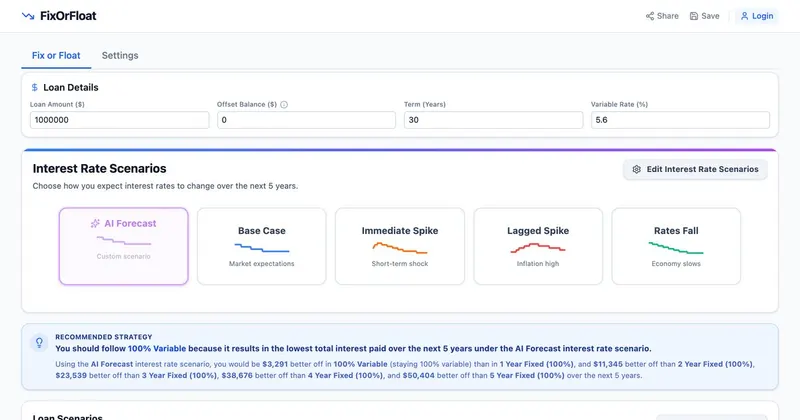
Fix or Float helps you decide how to split a home loan between fixed and variable rates. Enter the loan, pick how you think interest rates will move over five years, and it compares different fixed and variable splits on total interest paid.
It shows a five-year summary, a chart of your repayments over time, a chart of interest piling up, and a recommended strategy in plain English.
Who it's for (people on first-name terms with the cash rate)
Australians with a mortgage, a fixed rate about to expire, and an opinion about the Reserve Bank. People who check the cash rate more often than the weather, and enjoy it less.
How it works
Under Loan Details you enter the loan amount, offset balance, term in years and your variable rate. The offset matters, because cash in an offset account reduces the amount variable interest is charged on.
Then you choose a rate scenario: Base Case, Immediate Spike, Lagged Spike or Rates Fall, with labels such as market expectations, short-term shock, inflation high and economy slows. You can edit any scenario year by year, or override it month by month, if you've got a spare evening and a strong opinion.
Your variable rate is the RBA cash rate plus your bank's margin. A "Pull RBA" button fetches market forecasts for the cash rate from ASX 30-Day Interbank Cash Rate Futures, which is what traders are betting rates will do.
Loan scenarios are splits such as 50% fixed and 50% variable. Totals must add to 100%, and an auto-fix button helps if your maths doesn't. Default fixed rates are pre-filled from one major bank's published package rates. There's also an AI scenario generator: describe a path in words, such as "rates fall sharply in 2027 then stay low", and it models it.
A share link copies your scenarios. Nothing here is financial advice, and the page says so.
Lessons learned
- Treat a forecast as a story you can edit. Letting people change the rate path is more honest than pretending to know it.
- Label the data you borrowed. The page says where its default rates and forecasts come from, so you know what to swap.
- Let people prompt your finished app too. The AI scenario box turns a sentence into a rate path, so plain words become an input, not just how the tool was built.