Blog / Fun / HL-015 ·

Pokémon Binder
Collect and arrange Gen 1 cards in a digital binder. Gotta arrange 'em all, in a binder that never gets cordial spilt on it.
- Web tool
- Fun
- Live May 2026
- Web
What it is (sorting as a sport)
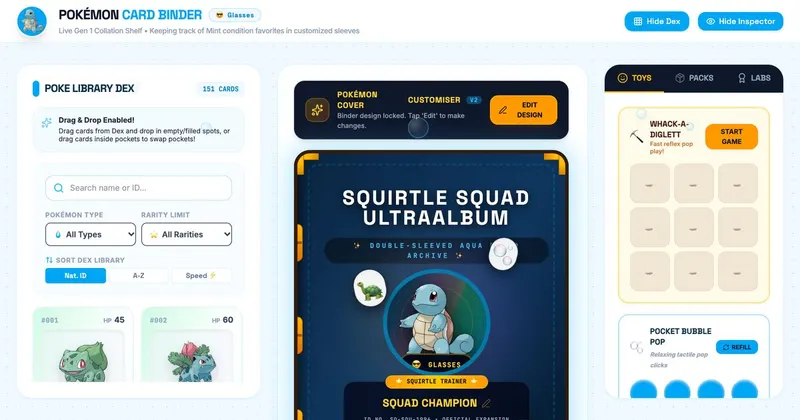
Pokémon Binder is a digital card binder for the original Generation 1 Pokémon. You collect cards, put them in pages and flick through them like an album. The pages are called sleeves, each one has pockets, and the cards tilt in 3D when you move over them.
It's a collector's tool, so there's no battling. It's mostly about putting things exactly where they belong, which for some of us is the whole hobby. The rest of us call it tidying and avoid it.
Who it's for (collectors and their exhausted parents)
Collectors who love sorting more than playing, and kids who'd like a binder that survives being left out in the rain. Also parents who have been asked to hold a real binder for an entire birthday party.
How it works
The screen has three parts. The Dex library sits on the left, your album binder in the middle, and an inspector and "Play-Zone" panel on the right. You can hide either side panel when you want the binder to have the stage.
In the library you search by name or ID, filter by type and rarity, and sort by National Dex number or by speed. Then you drag a card from the library into a pocket, or drag cards between pockets to swap them. No fingerprints on the holos.
When a page is full, the app tells you and suggests you tap "New Sleeve Page" to add another. You can also set custom grades on the active pocket, for the collector who has opinions about corners.
There are fun touches too: a Pokémon guardian avatar that speaks when you click it, and a sunglasses mode you can switch on. A "trading card sleeve system" label sits on the page like a tiny technical manual nobody asked for.
Lessons learned
- Use a familiar object as the interface. A binder with pages and pockets needs no tutorial, because everyone already knows how one works.
- When something fills up, say what to do next. The "page fully sleeved" message points straight at the next tap instead of just saying no.
- Borrow your words from the hobby, not from software. When you build by prompting an AI, naming things sleeves, pockets and pages gives the AI and the user the same picture.