Blog / Transport / HL-024 ·

SideTripper
Discover the stops you'd otherwise miss. For people who say "we'll just stop for a quick look" and mean it for four hours.
- App
- Transport
- Live Aug 2026
- Web
What it is (a licence to arrive late)
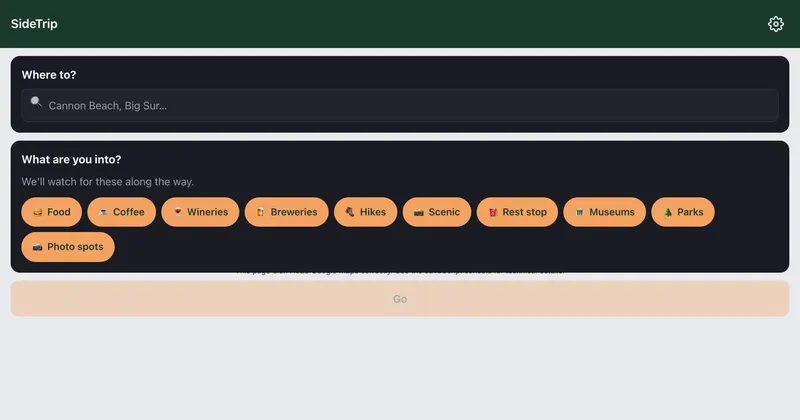
SideTripper turns a drive into a bit of a discovery. You enter where you're going, pick what you like (food, wineries, hikes, scenic spots, rest stops), and the app looks along your route for worthwhile detours. The idea is that when one comes up, it tells you what it is, how much time it adds and what it looks like. Tap "Take it" and you're rerouted. Tap "Skip" and you carry on like a sensible adult.
The home screen is a full-screen map with a floating search box. Routes and places come from Google Maps, and you set a maximum detour time. At the end of the trip, a summary shows your stops. It's free and doesn't need an account.
The first version was a text box and a handful of hand-written routes. It shipped in that "demo mode" before the real maps were wired in. A road trip with no road.
Who it's for (pie shop sign believers)
Weekend road-trippers, families on holiday, and anyone who thinks the journey matters as much as the destination. Also people who have driven past the same "Famous Pie Shop" sign for years and never once stopped. The pie is waiting. It has been waiting a long time.
How it was built
The first written plan listed a React Native app, a database with map add-ons, push notification services and a separate server. What got built is much lighter: plain web pages in a native wrapper called Capacitor, running on Google's cloud, for web, iPhone and Android.
The Google Maps code loads only when it's needed. If maps aren't set up, the app falls back to the hand-made demo routes, so it never shows a blank map. The maps settings live in their own file, because the build tool regenerates its own file and would wipe any hand edit.
A privacy detail: the app used to download Firebase, Google's sign-in toolkit, every time it started, even though nobody could sign in. That was fixed when we wrote the App Store privacy label, which now says the app collects no data. The label is only honest if the app is.
Lessons learned
- Check the store, not the success message. Four stacked signing bugs meant no iPhone build had ever been built or uploaded, even though the release step reported success, so now the first check is Apple's own list of builds.
- Make sure the screenshots show the real product. The store screenshots were taken at 22:14, before the real app was written at 23:42 that night, so every one showed the empty starting template.
- Read the privacy label against what the app really does. An AI agent had left in a sign-in toolkit that contacted Google for a feature nobody could reach, and writing the label honestly caught it.
- Keep your own settings out of files a tool rewrites. Anything you add to a generated file gets wiped on the next build, so hand-made settings need a file of their own.