Blog / Learning / HL-013 ·

SpeedyTimer
A polished Rubik's Cube timer for serious training. A cube timer so serious it has a setting for how long you hold the spacebar.
- Web tool
- Learning
- Live Apr 2026
- Web
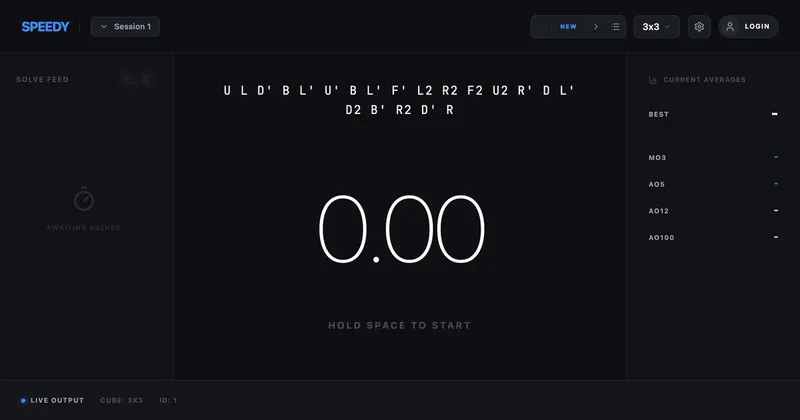
What it is (a way to feel slower in public)
SpeedyTimer is a timer for Rubik's Cube practice. You get a scramble, you hold, you let go, you solve, you stop. It records the time and builds up your averages as you go, whether you wanted to know them or not.
It's built for people who care about tenths of a second, and who can tell you their best time without being asked.
Who it's for (people with very fast thumbs)
Cubers who are training, and people who are about to start training. Anyone who has ever wished their cube timer was less clunky.
How it works
You run the timer by holding the spacebar, or by tapping on a touchscreen, and the page tells you which. It shows "Steady..." while you hold and starts when you let go. There's an optional 15-second inspection, in the style of official competitions, for staring meaningfully at the cube.
The numbers are the point. You see your current averages and your "possible" averages, which show the best and worst result you could still finish with for an average of 5 or 12 (called BPA and WPA). There's also a time history, a scramble display and a panel with details for each solve.
Settings include:
- spacebar hold time, in milliseconds
- showing or hiding milliseconds, and hiding the time while you solve
- splits, so each press records a sub-time
- timer font size and accent colour
- whether to show the next scramble while you solve
Sessions can be sorted, searched, imported from a file, copied or downloaded. Solves can be edited or commented on, including the one where the cube slipped, honestly. You can use it on its own, or link a Google account to sync across devices.
Lessons learned
- Sweat the small settings. Hold time in milliseconds is a tiny option, but it's the kind serious users notice first.
- Let people take their data with them. Import, export and copy mean a session is never trapped in one app.
- Choose the buttons yourself. An AI builder will happily add a lot of buttons, so a non-engineer has to decide which ones a cuber actually wants.